Síť, která vrací
technologii zpátky lidem.
PMGclub je nová síť pro ty, kdo věří, že civilizace roste tehdy, když se oheň dostane mezi lidi.
Klára se ptá: Q-live a jeho výhody.

Aby publikum nezívalo
Aby na konferenci ožilo
Q-Live je interaktivní nástroj pro konference, prezentace, školení a workshopy. Účastníci se připojí přes krátký kód nebo QR — bez registrace — a vy s nimi v reálném čase pracujete: ankety, kvízy, word cloudy, Q&A z publika. Výsledky se promítají živě na velkém plátně.
- 5 typů otázek: multiple choice, kvíz s leaderboardem, word cloud, otevřený text, hodnocení 1–5
- Účastníci bez registrace — stačí kód ABC-123 nebo QR z projektoru
- AI generuje otázky z tématu prezentace (Premium)
- Q&A z publika s upvotováním a moderací
- Analytika a export výsledků do Smart Presentation
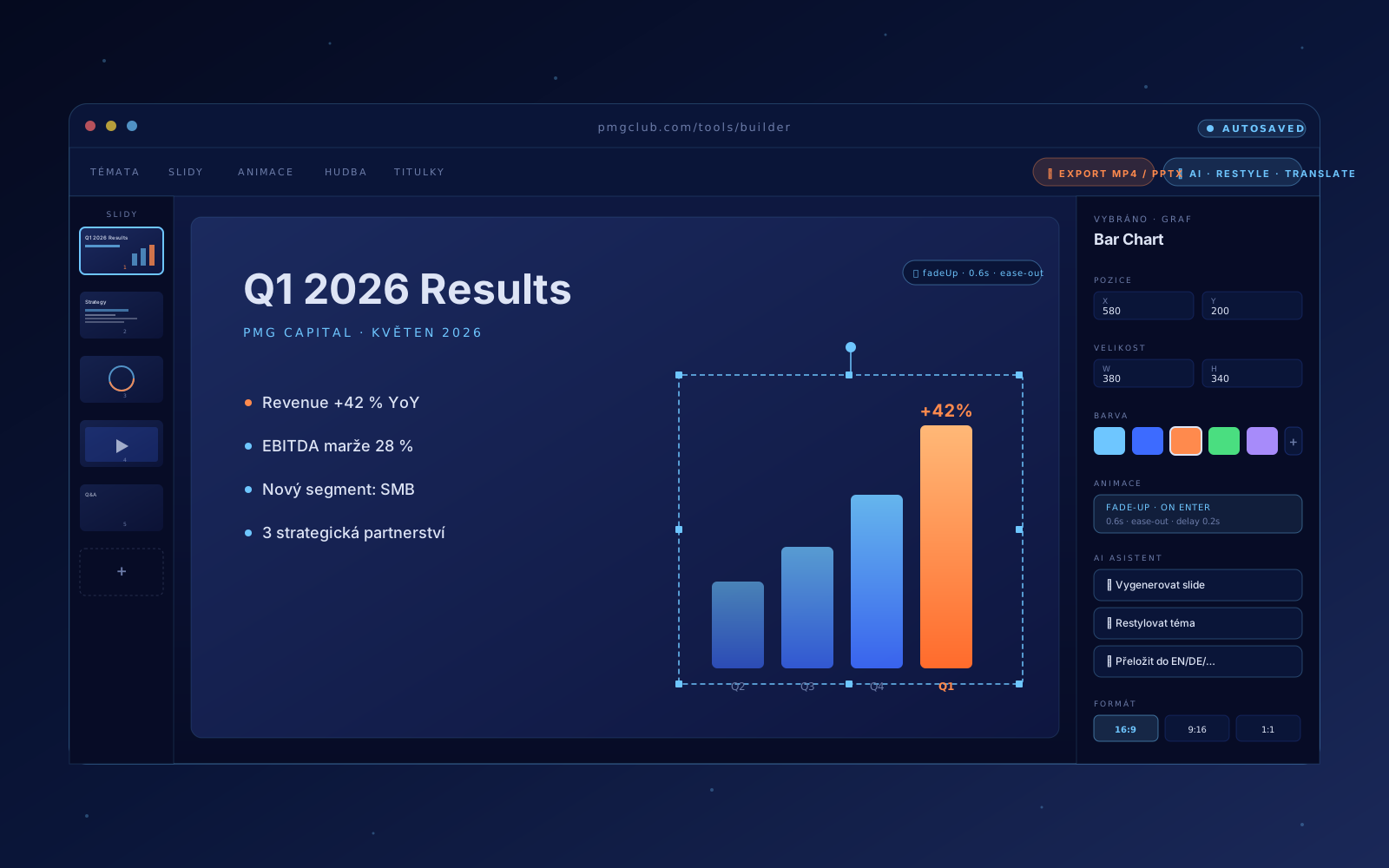
Prezentace bez PowerPointu
Od nápadu k MP4 za 10 minut
Presentation Builder je plnohodnotný prezentační nástroj v prohlížeči. AI vygeneruje strukturu z tématu nebo nahraných materiálů (PPTX/PDF), v Builderu doladíte text, obrázky, videa, animace a hudbu — a exportujete do PPTX, PDF nebo přímo do MP4 s hudbou, narrací a vypálenými titulky. Bez instalace, bez licence.
- AI generuje strukturu z tématu nebo importu PPTX/PDF
- Vizuální editor s vrstvami, animacemi (fade, slide-in, zoom) a per-objekt timing
- Multimédia: obrázky, video s titulky (vč. AI překladů do 8 jazyků), hudba a voice narrace
- 3 formáty: 16:9 prezentace, 9:16 pro stories, 1:1 čtverec
- Export do PPTX, PDF i MP4 — sdílení linkem, embed do feedu PMGclub nebo stažení
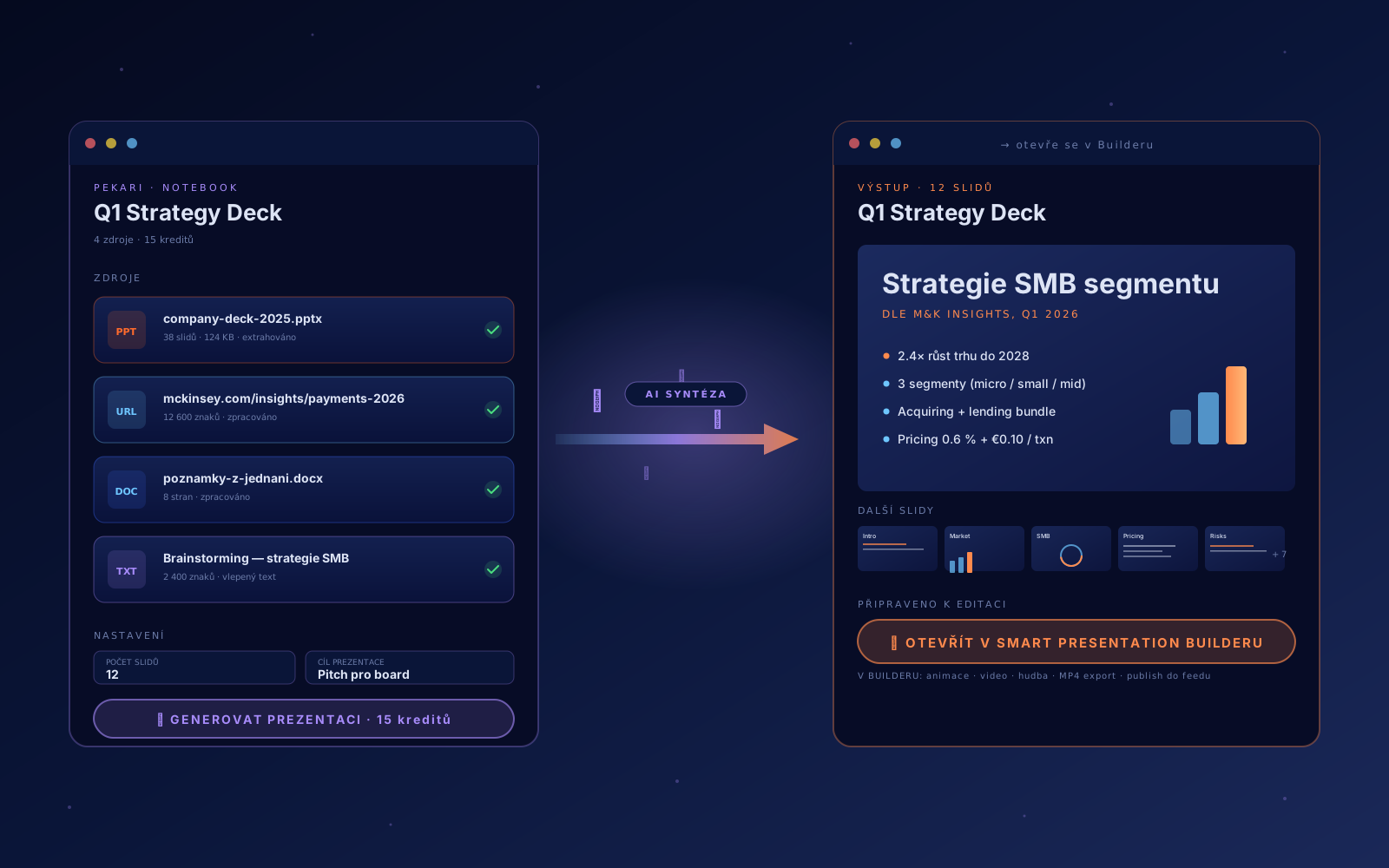
Více zdrojů → jedna prezentace
Materiály už máš. AI z nich postaví strukturu, Builder ji doladí.
Pekari Tool je vstupní brána do Presentation Builder pipeline ve stylu NotebookLM. Nahraj PPTX, Word, vlepený text nebo 3 URL adresy — AI je zpracuje, syntetizuje a vygeneruje strukturovanou prezentaci. Ta se otevře přímo v Builderu, kde doplníš animace, hudbu, video, narraci a exportuješ do PPTX, PDF nebo MP4. Jenom za 15 kreditů místo 50.
- 4 typy zdrojů: PPTX, DOCX, URL (web scrape), vlepený text — kombinuj libovolně
- AI syntéza místo generování od nuly — vychází z reálných dat, ne z výmyslu (15 kreditů vs. 50)
- Nastavíš cíl prezentace (pitch / školení / interní review) a počet slidů (4–20), AI tomu přizpůsobí styl
- Notebook se uloží — můžeš regenerovat s novými zdroji nebo upraveným cílem bez začínání odznova
- Výstup → přímo v Builderu: animace, video, hudba, vypálené titulky, MP4 export, publish do feedu

Telefon je tvůj klikátko a poznámkový panel
Laptop visí na projektoru. Ty máš jen telefon.
Prezentuj naživo přímo z prohlížeče bez závislosti na laptopu. Projektor URL otevře režie na laptopu připojeném k projektoru, ty si na svém telefonu otevřeš Clicker URL a ovládáš prezentaci v reálném čase — vpřed/zpět, speaker notes jen pro tebe, pouštění Q-Live anket mezi slidy. Plus podpora USB clickerů (Logitech a další) pro keynote-style ovládání.
- Dva stabilní URL: Projektor URL pro režii (laptop u projektoru) + Clicker URL pro tebe (telefon)
- Vpřed / zpět z telefonu nebo z USB clickeru — Logitech, Targus, R400 (triple-detection i pro Windows Chrome)
- Speaker notes per slide — vidíš jen ty, audience na projektoru ne
- Q-Live integrace — pustíš anketu nebo kvíz mezi slidy, výsledky se promítnou živě
- Real-time sync přes Supabase Realtime — latence ~24 ms, žádné lagy
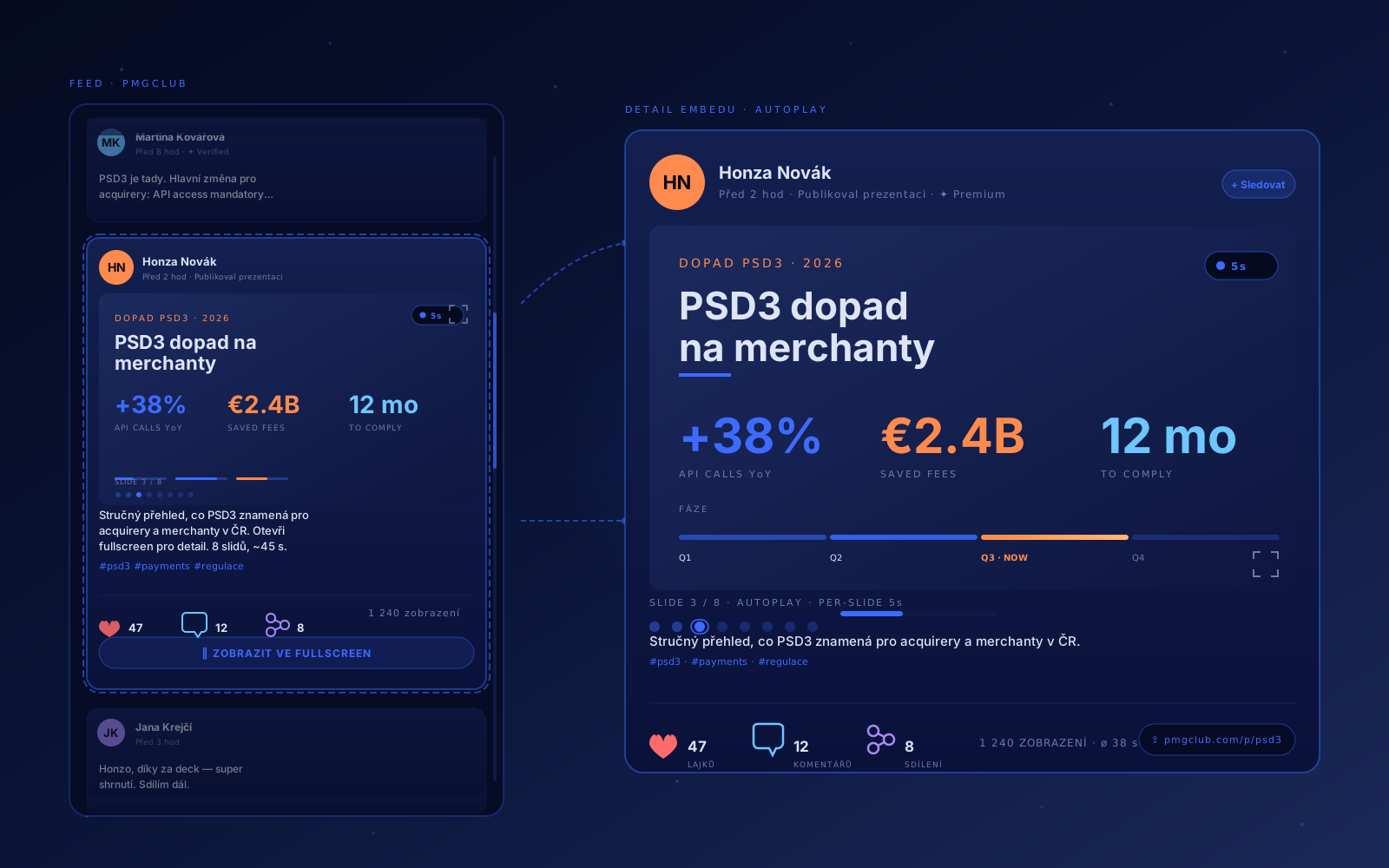
Prezentace, která žije ve feedu
Místo PDF v emailu — autoplay deck, který si lidé prolistují cestou ranní kávou.
Publikuj hotovou Smart Presentation jako post ve feedu PMGclub. Slidy se přehrávají automaticky s timingem, který si nastavíš (3–15 s per slide), publikum lajkuje, komentuje a sdílí přímo pod postem. Bonus: public URL pro sdílení mimo PMGclub (LinkedIn, email, web) bez nutnosti registrace pro čtenáře. Sleduješ zobrazení, průměrnou dobu sledování a engagement v galerii.
- Jedno kliknutí z editoru — Publikovat ve feedu → tvoje prezentace je live
- Autoplay s per-slide timingem (3–15 s) — divák může pauznout nebo otevřít fullscreen
- Lajky, komentáře, sdílení přímo v PMGclub feedu — sociální distribuce bez emailů
- Public URL (např. pmgclub.com/p/psd3) pro sdílení na LinkedIn, e-mail, web — bez registrace
- Metriky v galerii: zobrazení, průměrná doba sledování, engagement per prezentace
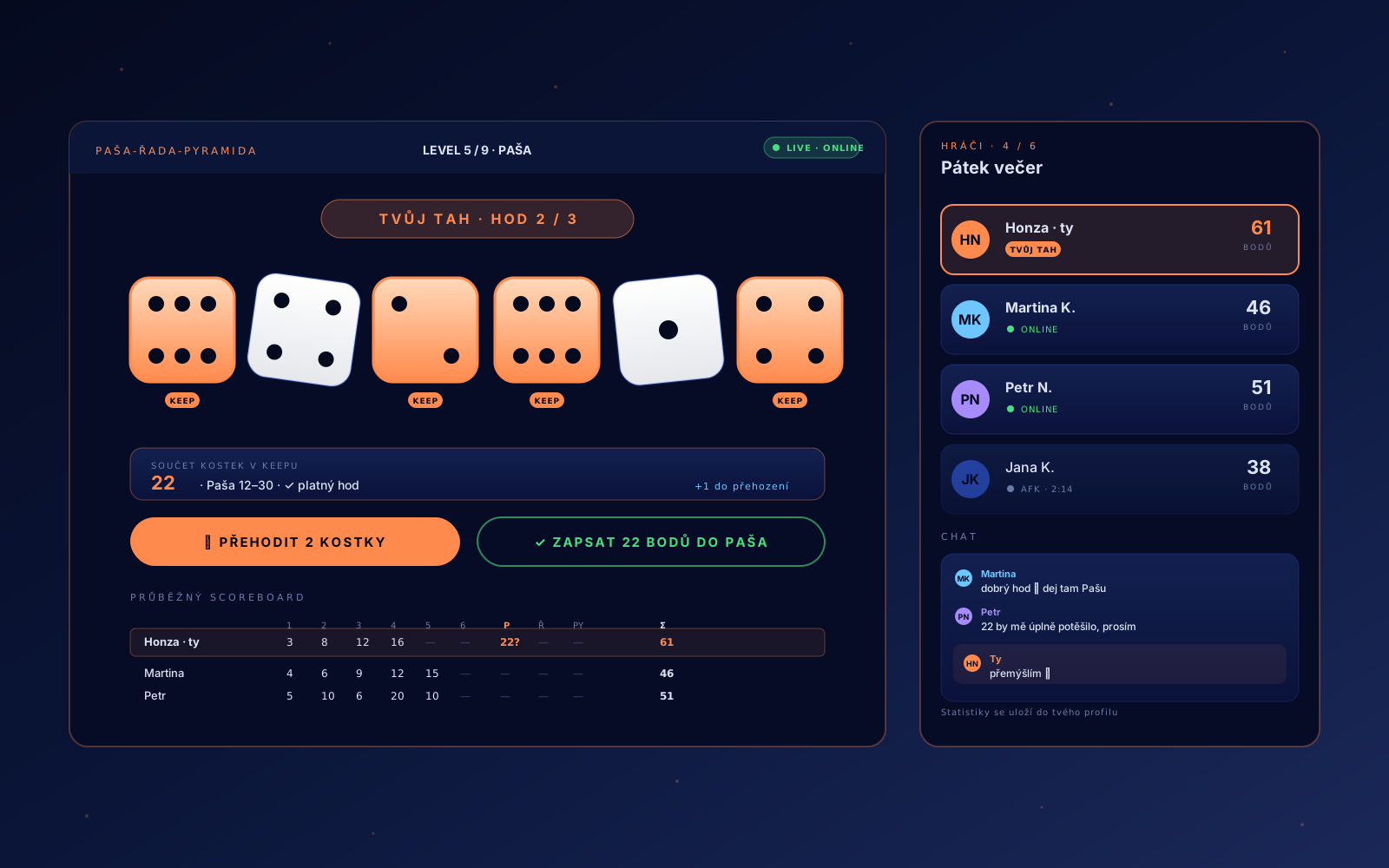
Pátek večer se 6 kostkami a kamarádama
Kostková klasika online — kdykoliv a s kýmkoliv z PMG komunity.
Paša-řada-pyramida je klasická česká kostková hra na 6 kostek a 9 levelů. Na PMGclub ji hraješ online v reálném čase s lidmi z komunity (1–6 hráčů) — kostky háže aplikace, scoreboard se počítá sám, chat běží během hry, statistiky se ukládají do profilu. Plus offline scorekeeper, když sedíš u stolu s fyzickými kostkami.
- Online 1–6 hráčů v reálném čase přes Supabase Realtime — žádné lagy, 5 min timeout na tah
- 9 levelů × 6 kostek × 3 hody na tah — klasická pravidla (Paša 12–30 sudé, Řada 21, Pyramida)
- Chat během hry — popichuj soupeře, sdílej GIF (no, jen text 🤷)
- Statistiky se ukládají do profilu — vyhrané hry, průměrné skóre, leaderboard přátel
- Offline scorekeeper — když sedíš u stolu s fyzickými kostkami, appka jen zapisuje a validuje skóre

Anketa, která žije týdny ve feedu
Sleduj puls sítě bez live eventu — síť odpovídá průběžně, ty sbíráš insight.
Q-Live Pulse je druhý mód Q-Live (vedle klasického Event pro konference). Místo live prezentace pro sál běží Pulse jako post ve feedu PMGclub — dny nebo týdny. Síť odpovídá průběžně bez tlaku, ty sbíráš data jako podklad pro thought leadership, market research nebo network sentiment. Bonus: AI ti generuje průběžné shrnutí, segmentaci po typech firem (banky / fintech / acquirery) a sentiment trend.
- Publikuješ Pulse jako post ve feedu — tvoje síť odpovídá průběžně, žádný live event, žádný tlak
- Multiple choice + rating (1–5) — UX optimalizovaný pro embed ve feedu (vertikální karusel)
- Daily heartbeat: vidíš denní odpovědi jako waveform + projekci k datu uzávěrky
- AI shrnutí sentimentu + segmentace po typech firem (banky / fintech / acquirery / ostatní)
- Export CSV nebo přímo do Smart Presentation — Pulse data jako slide v dalším pitch decku
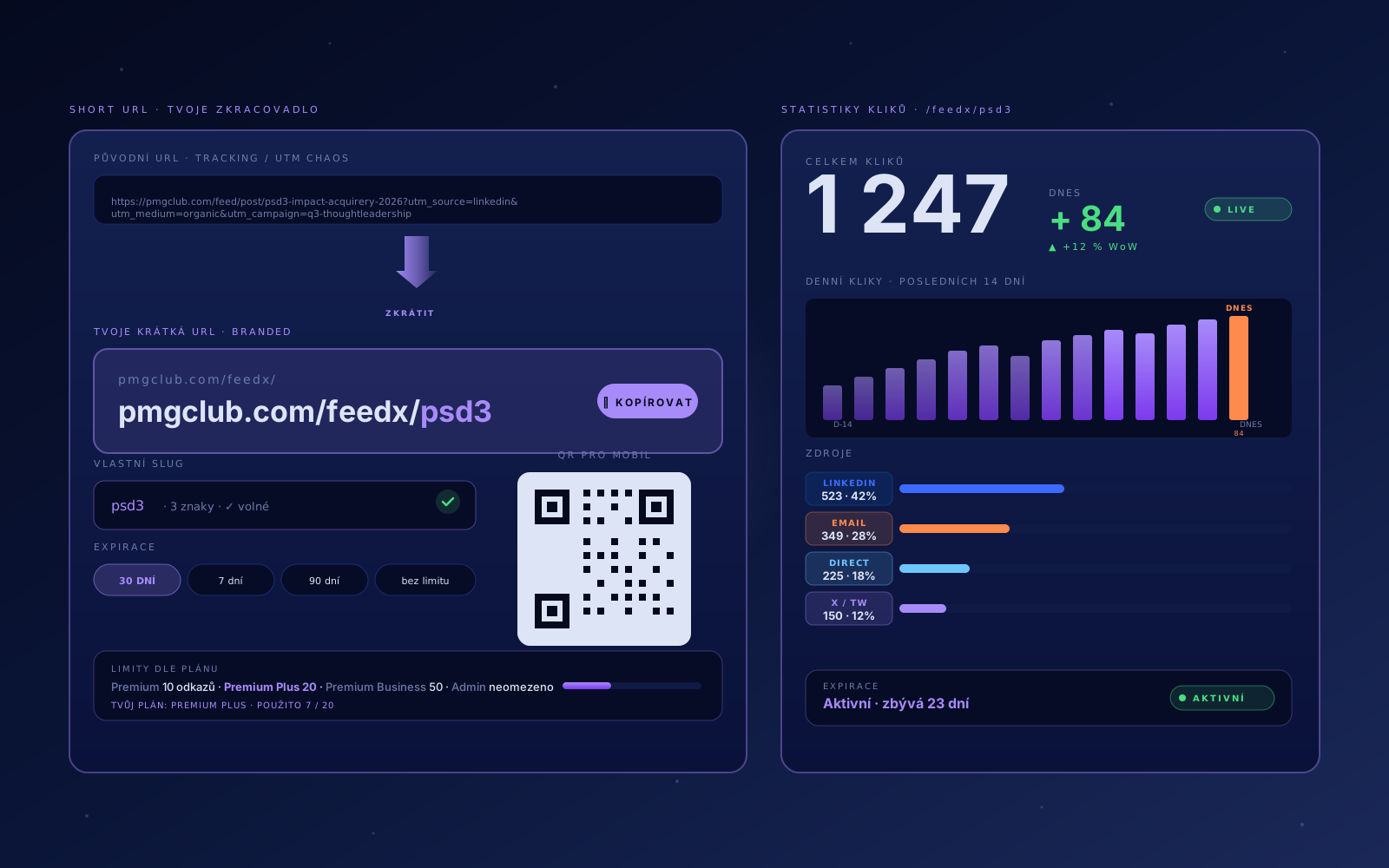
Vlastní zkracovač pod pmgclub.com/feedx/
Místo bit.ly — branded link s tracking kliků a expirací.
Zkracovač URL pod doménou pmgclub.com/feedx/{tvůj-slug}. Sdílíš odkazy v prezentacích, postech, e-mailech a vidíš, kolikrát kdo na ně klikl — celkem, denně, podle zdroje (LinkedIn, email, direct, X). Bonus: nastavíš expiraci pro časově omezené kampaně, QR kód pro tisk a vlastní slug místo náhodného řetězce.
- Branded short URL — pmgclub.com/feedx/q1-2026 místo bit.ly/xY8Zq
- Tracking kliků: celkem, denně, podle zdroje (LinkedIn, email, direct, X)
- Vlastní slug nebo náhodný — backend zkontroluje, jestli je volný
- Expirace pro časově omezené kampaně (7 / 30 / 90 dní nebo bez limitu)
- QR kód pro tisk + Premium 10 / Premium Plus 20 / Premium Business 50 odkazů
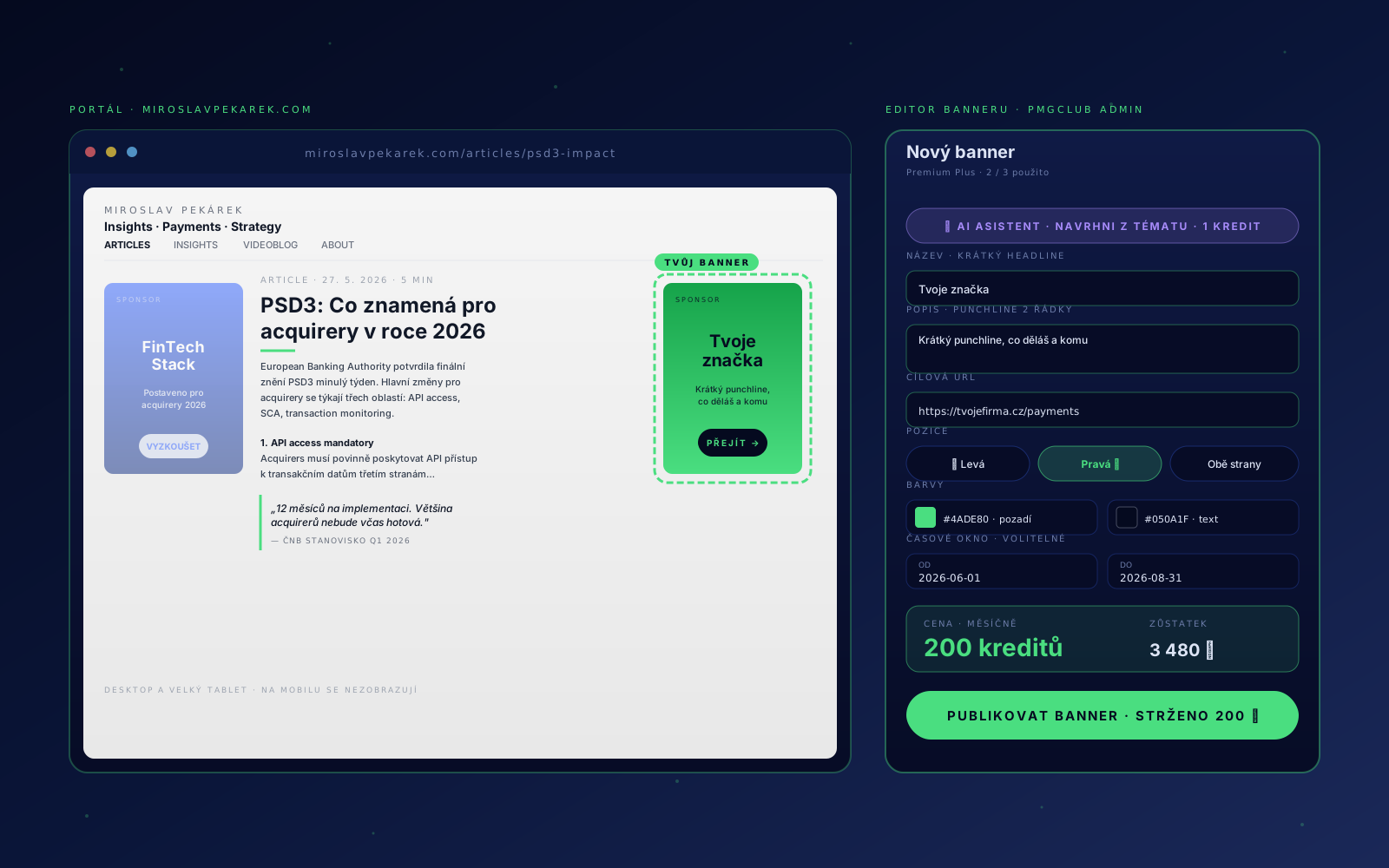
Tvoje značka vedle článků o platbách
Sticky banner 160×220 na miroslavpekarek.com — kde čte tvoje cílovka.
Bannery jsou cross-portal inzerce uvnitř PMG ekosystému. Tvoje značka 160×220 px sticky vedle článků na miroslavpekarek.com — externím portálu o platebním průmyslu, který čtou banky, fintechy a acquirery. Vytvoříš banner přes PMGclub admin (název, popis, URL, barvy, časové okno), AI ti pomůže s textem, platíš kredity měsíčně. Premium feature 1 / 3 / 5 bannerů dle plánu, desktop-only (mobil zůstává čistý).
- Sticky 160×220 banner na miroslavpekarek.com (levá / pravá / obě strany)
- Cílovka: banky, fintechy, acquirery, payments profesionálové čtoucí MP insights
- AI asistent: 1 kredit za návrh názvu a popisu z toho, co děláš (GPT-4o-mini)
- Časové okno: nastavíš od / do datumu pro kampaně, akce, eventy — banner se zapne a vypne sám
- Premium 1 / Plus 3 / Business 5 bannerů · cena v kreditech / měsíc (viz editor)